
Verify your company domain
How to add your domain, publish the DNS records at your provider and unlock sending.
To send under your company's name, Hermod needs to know the domain is yours. This is done with DNS records: short configuration lines you publish in the panel where your domain is managed (Registro.br, GoDaddy, Cloudflare, Hostinger, Locaweb and others). Until the required records are correct, sending is blocked, but you can already build campaigns.
♪ No narration: the explanations appear on screen, with background music.
Add the domain
- In the menu, open Domains (Administration area).
- Click New domain, type the domain (for example,
suaempresa.com.br) and click Add. - Hermod shows the records that need to be published.
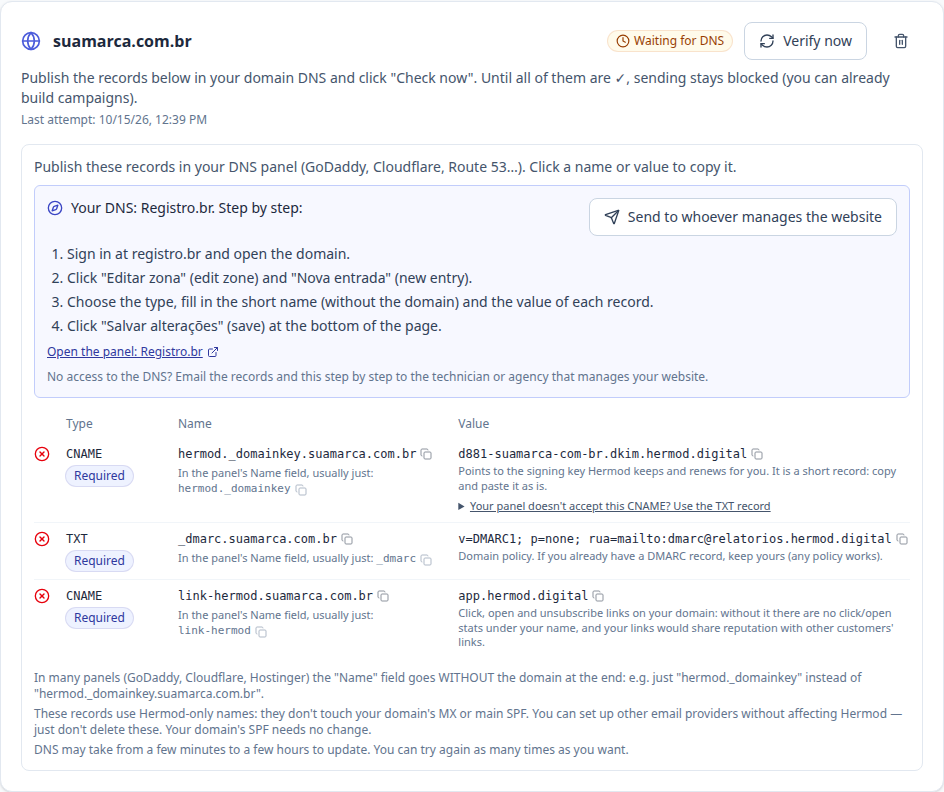
The records
| Record | Type | What it does |
|---|---|---|
Signature (name ending in ._domainkey) |
CNAME | Hermod's digital signature: proves the email is yours. The key is stored and renewed by Hermod. |
_dmarc |
TXT | The domain's policy. Gmail and Yahoo require one. If your domain already has a DMARC record, keep yours. |
link-hermod |
CNAME | Makes click, open and unsubscribe links use your domain, not other customers'. |
Click a name or value on the screen to copy it. These records use names that belong only to Hermod: they don't touch your current email (MX) or your website.
Guide for your DNS provider
Hermod finds out where your DNS is managed and shows the step by step for that panel, with a link to it and its pitfalls. For example: on Cloudflare, link-hermod must be set to "DNS only" (grey cloud); on Oracle, you must click "Publish changes" at the end.
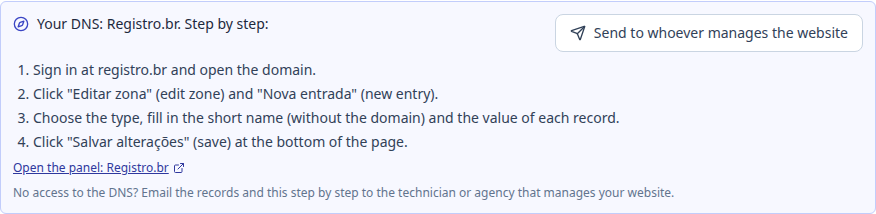
Not comfortable with DNS?
Click Send to whoever manages the website. Enter the email of the technician or agency (up to 3) and, if you want, a note. They receive the list of records, the step by step for their panel and a request to let you know. When they reply, the answer goes straight to your email.
Verify
After publishing, go back to Domains and click Verify now. DNS can take from a few minutes to a few hours to update; you can try as many times as you like. When all required records show ✓, the domain becomes Ready to send and you get an email.
If something is wrong, Hermod tells you what. The most common cases:
- Created as TXT, but it must be CNAME: delete the record and create it again with type CNAME.
- Domain repeated in the name (like
link-hermod.suaempresa.com.br.suaempresa.com.br): delete it and create it again typing only the short part. - CNAME pointing elsewhere: edit the value so it is exactly what Hermod shows.
Once active
Hermod checks your DNS every day. If a required record is deleted or changed (this happens a lot when moving DNS to another provider), sending is blocked and you get an email listing what needs to come back. Fix it and click Verify now: sending resumes on its own and waiting campaigns continue.