
Start here: from sign-up to your first campaign
The full path in five steps, in the right order, to send your first campaign with good delivery.
Hermod sends bulk email on behalf of your company: newsletters, announcements and campaigns. For them to reach the inbox (and not spam), a few things must be ready before the first send. The Dashboard shows these steps in the First steps box and checks each one off on its own when you finish it.
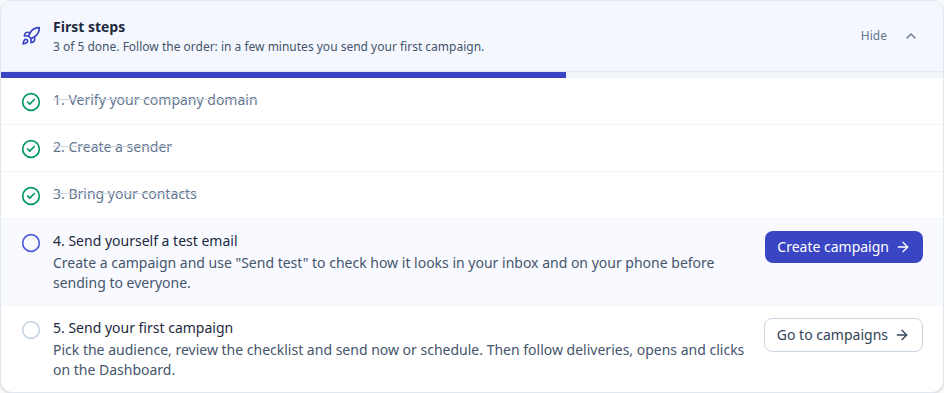
1. Verify your company domain
The domain is the part after the @ in your emails, like suaempresa.com.br. You add the domain to Hermod and publish three records in your DNS panel (where your website and email are configured). This proves you own the domain and makes providers trust your emails.
See the step by step in Verify your company domain.
2. Create a sender
The sender is the "From:" of your campaigns, like Ana da Sua Empresa <ana@suaempresa.com.br>. It can only use a verified domain. See Create a sender.
3. Bring your contacts
Import a spreadsheet (CSV or Excel) into Hermod's own contact list, or connect Dolibarr or your WordPress newsletter. Only import people who agreed to receive your emails. See Import contacts.
4. Send yourself a test
Build the campaign and use Send test to see how it arrives in your inbox, on desktop and on your phone, before sending it to everyone.
5. Send your first campaign
Pick the audience, clear the review checklist and send now or schedule it. Then follow deliveries, opens and clicks on the Dashboard. See Create and send a campaign.
Short videos
Rather watch before doing? Each of these guides starts with a captioned video of up to 2 minutes:
- Verify your domain
- Import contacts
- Create and send your first campaign
- Create a workflow from a ready-made template
Guided tours
The first time you open the Domains screen, a campaign or a workflow, a quick tour shows what each part is for. You can skip it at any time, and once seen it does not come back on its own. To take it again, click the ? next to the screen title and then Take the tour of this screen.
Free trial
Your account starts with a 14-day trial with 200 sends, no card required. When you want to continue, choose a plan in Plan and billing. Subscribing during the trial gets you a discount. If the trial ends without a plan, the data is kept for 7 days. See Plan, billing and cancellation.