
Unsubscribes, complaints and the block list
Who stops receiving your campaigns, why, and how to reactivate someone who asked to come back.
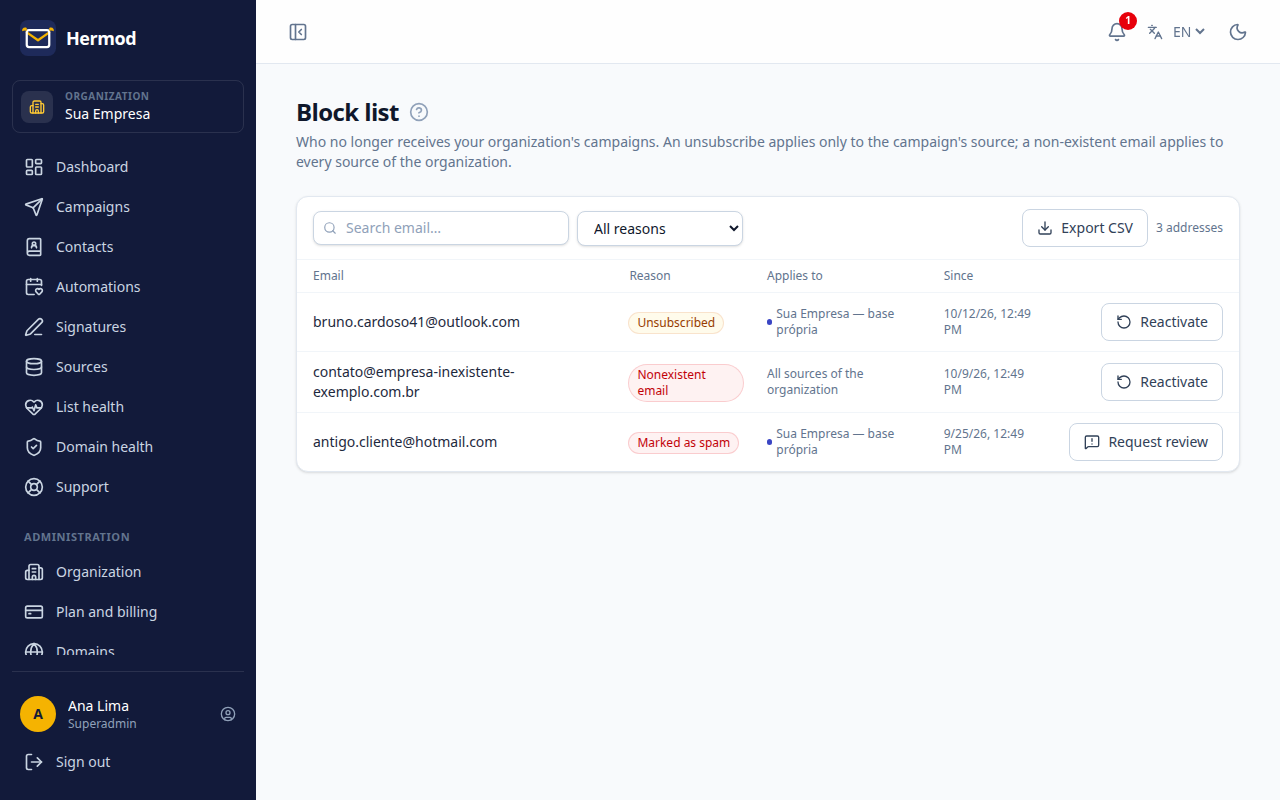
Every Hermod campaign has an unsubscribe link in the footer and in the email header (the "Unsubscribe" button Gmail and others show). Honoring that request is a legal obligation (LGPD) and protects your organization's sending reputation. The Block list gathers everyone who no longer receives your campaigns.
Who goes on the list
| Reason | Applies to |
|---|---|
| Unsubscribe (the person clicked the link) | The campaign's source |
| Spam complaint (the person marked the email as spam) | The campaign's source |
| Non-existent email (the provider bounced the email) | All of the organization's sources |
Unsubscribes and complaints apply to the source because the person asked to leave that list: if your organization has two brands in different sources, the other one can still send. A non-existent email can't receive from any of them.
The list is in Block list (Administration area), and only the organization's superadmin sees it.
Look up an address
Type the email in the search to find out whether it's blocked, why and since when.
Reactivate someone who asked to come back
If someone who unsubscribed asked to receive emails again, record the evidence of the new request (for example, the email in which they asked) and reactivate them. It's one contact at a time, and everything is recorded in the Audit log.
Spam complaints are more serious: they only come back after a review by the Hermod team. You send the request with the evidence and receive an email with the decision.