
List health: why some contacts are left out
How Hermod checks each source's emails, what the quality score means and when a list is put on hold.
Sending email to addresses that don't exist is the fastest way to lose reputation with Gmail and Outlook. That's why Hermod checks each source's emails and leaves out of campaigns anyone who won't receive them. You save sends and protect your campaigns' delivery.
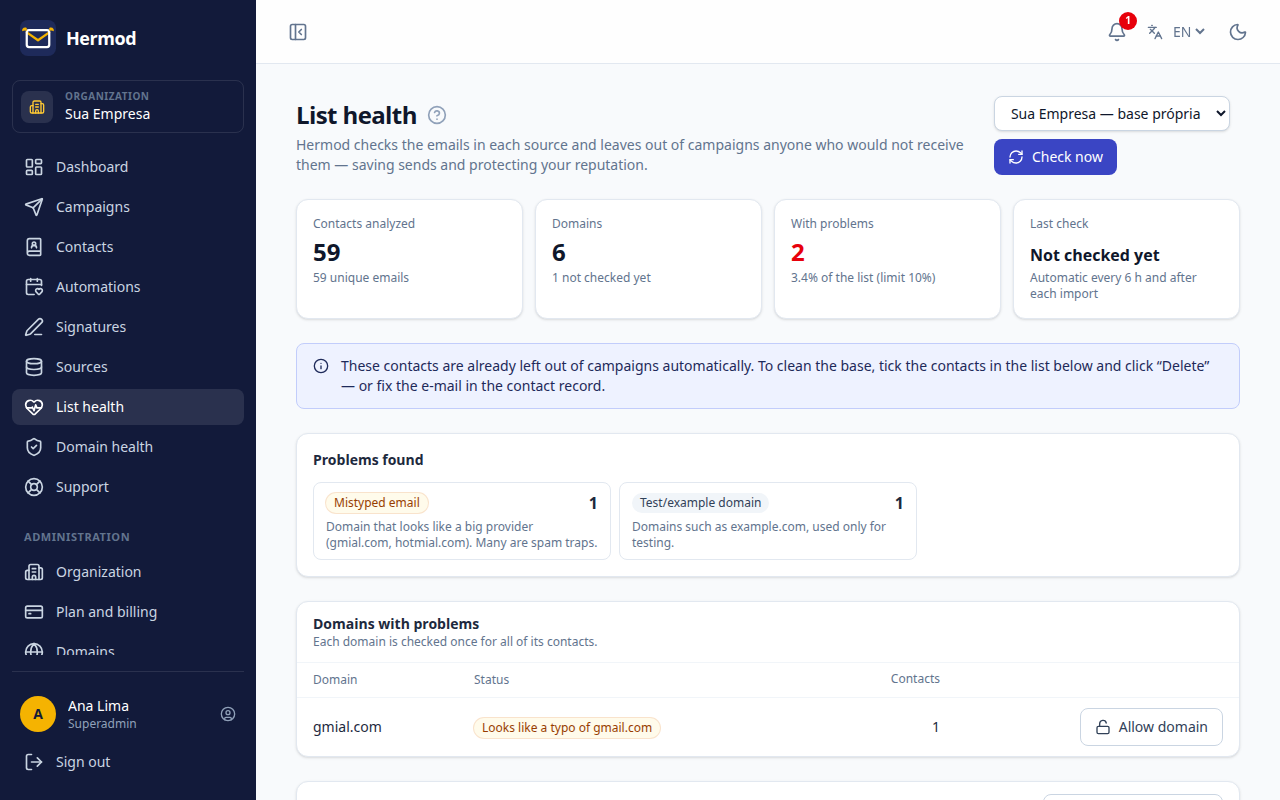
What Hermod checks
- Typos in well-known domains (like
gmial.comorhotmal.com). In your own list, you fix them with one click, one at a time or several at once: select the contacts and click Fix selected. If the correct email already belongs to another contact, Hermod asks whether to delete the duplicate (its lists move to the correct contact). - Domains that don't exist or don't receive email (no mail server registered).
- Disposable, test or technical addresses (like
noreply@orpostmaster@). - Emails that already bounced as non-existent in earlier campaigns.
These contacts are left out of campaigns automatically. You don't have to do anything to be protected, but cleaning the list is worth it.
How to clean
- Own list: select the contacts in the list and click Fix selected (typos) or Delete, or fix the email on the contact's record.
- Dolibarr or WordPress: fix the email at the origin. Use Download list to hand the list to whoever maintains the records.
Then click Verify now to update the score.
List on hold
If more than 10% of a list's emails have problems, it is put on hold: no campaign goes out from it until it's cleaned. This usually means an old list or one of unknown origin. Fix or remove the problem contacts and click Verify now: the list is released on its own once it's below the limit.