
Email signatures
How to create the signature that goes at the end of your campaigns, with name, title, phone and logo.
The signature is the block at the end of the email with name, title, phone and logo. You create it once in Signatures and pick it in each campaign, in the Setup step.
Create
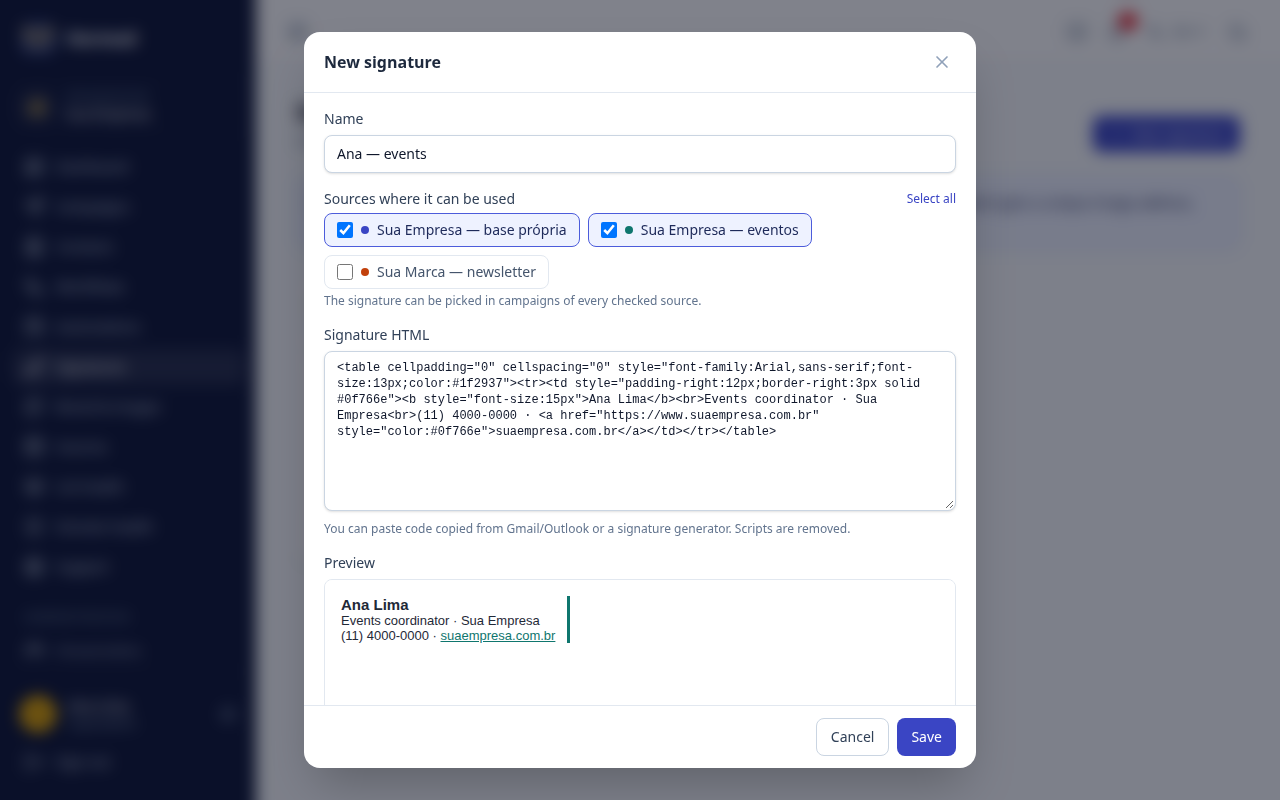
- Open Signatures and click New signature.
- Paste the signature HTML. It can be the code copied from Gmail or Outlook, or from a signature generator.
- Save. If something isn't compatible (like an attached
cid:image), Hermod warns you on the signature's card.
Sources
When you create the signature, check the sources where it can be used — one, several or all (Select all shortcut). The same signature then serves campaigns from different bases, with no need to copy it for each source. You can add or remove sources later in Edit.
- A source can only be removed from the signature if no unfinished campaign of that source is using it. Campaigns already sent keep the signature in their history.
- Someone without access to every source of a signature can use it in their own sources, but can't edit or delete it — otherwise they would change what goes out in sources they can't see.
Images
Hermod copies the signature's images to its own server. In real sends, each recipient gets a unique image address: that's how Hermod knows who opened the email. Scripts are removed.